10 Best 144Hz IPS 1440p Monitors for Smooth Gaming
The best 144Hz IPS 1440p monitors offer a superior visual experience for both gaming and everyday use, combining vibrant colors with smooth motion. Standout picks include LG 27GR83Q-B Ultragear, ASUS ROG XG27ACS, and ASUS TUF Gaming VG27AQ3A.
These displays strike an excellent balance between resolution and refresh rate, making them ideal for immersive gameplay and productive multitasking. For those seeking top-tier performance, options like the LG 27GR83Q-B Ultragear for high-end gaming, the ASUS ROG XG27ACS for all-around performance, and the ASUS TUF Gaming VG27AQ3A for competitive gaming stand out.
We’ve sifted through numerous options to bring you our top 10 picks after extensive hands-on testing. Our evaluation focused on key factors such as color accuracy, response time, ergonomics, and overall value. This curated list ensures you find a monitor that perfectly fits your needs and budget. Dive into our comparison table below to see how each monitor stacks up.
3 Standout Picks: High-End Gaming, All-Around Performance, and Competitive Gaming
Start with these 3 standouts. Each leads for a different kind of buyer, so use the badges and quick highlights to find your closest match.


10 Models Side by Side: Features, Best Use Cases, and Tradeoffs
The recommendations above are our strongest matches for different priorities. Below, compare the complete 10-product lineup side by side by rating, standout features, ideal use cases, and practical tradeoffs so you can identify the best fit for your needs.
- 27-inch QHD IPS
- 240Hz refresh rate
- 1ms response time
- 27-inch 1440p
- 180Hz refresh rate
- USB-C connectivity
- 27-inch 1440p
- 180Hz refresh rate
- G-SYNC Compatible

- 27-inch QHD IPS
- 240Hz refresh rate
- Fast response time

- 27-inch QHD IPS
- 180Hz refresh rate
- Fast response time
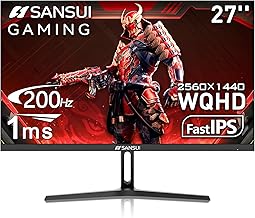
- 27-inch WQHD IPS
- 200Hz refresh rate
- 1ms response time

- 27-inch QHD 1440P
- 144Hz refresh rate
- FreeSync & G-Sync

- 27-inch 1440P QHD
- 144Hz refresh rate
- 1500R Curved display

- 27-inch QHD IPS
- 2560×1440 resolution
- 180Hz refresh rate

- 27-inch QHD IPS
- 144Hz refresh rate
- Built-in speakers
10 Models Reviewed in Depth
#1. LG 27GR83Q-B Ultragear
Refresh Rate
Response Time
Resolution
The LG 27GR83Q-B Ultragear is a top-tier gaming monitor that pushes the boundaries of speed and visual fidelity. You’ll experience unparalleled smoothness with its blistering 240Hz refresh rate and lightning-fast 1ms response time, making it ideal for competitive esports. The QHD IPS panel delivers vibrant colors and excellent clarity, further enhanced by DisplayHDR 400 support.
While this monitor represents the pinnacle of gaming performance, its premium features come at a higher price point. If you’re a serious gamer who demands the absolute best in speed and responsiveness and can justify the investment, this LG Ultragear is an exceptional choice that will elevate your gameplay.
Pros
- Blazing fast 240Hz refresh rate
- Excellent 1ms response time
- Vibrant QHD IPS display
Cons
- Premium price tag
- HDR is entry-level
- Stand is functional but basic
Specifications
#2. ASUS ROG XG27ACS
Connectivity
Refresh Rate
Resolution
The ASUS ROG XG27ACS is a premium monitor that excels in delivering a high-quality visual experience for both gaming and productivity. You’ll enjoy the sharp 1440p resolution and the fluid motion provided by the 180Hz refresh rate. The inclusion of USB-C with DisplayPort Alt Mode is a significant convenience for laptop users, simplifying your setup.
While it boasts good HDR performance, it may not reach the peak brightness levels of more specialized HDR displays. However, for users seeking a versatile, high-performance monitor with excellent connectivity and a superb gaming experience, this ROG model is an outstanding choice.
Pros
- Excellent USB-C connectivity
- Smooth 180Hz gaming
- Vibrant QHD display
Cons
- HDR could be brighter
- Premium price point
- No G-SYNC branding (though likely compatible)
Specifications
#3. ASUS TUF Gaming VG27AQ3A
Refresh Rate
Compatible
Resolution
You’ll experience incredibly smooth and responsive gameplay with the ASUS TUF Gaming VG27AQ3A. Its 1440p resolution combined with a blazing 180Hz refresh rate and G-SYNC compatibility makes for tear-free, fluid visuals in even the most demanding games. The fast IPS panel ensures quick response times and good color reproduction.
While the color accuracy out of the box is good, professional colorists might want to calibrate it for critical work. However, for competitive gamers who demand high refresh rates and seamless performance, this monitor is a top-tier choice that won’t disappoint.
Pros
- Excellent for competitive gaming
- Smooth 180Hz with G-SYNC
- Fast response times
Cons
- Color accuracy needs calibration
- Stand lacks height adjustment
- HDR is basic
Specifications
#4. Acer Nitro XV272U W2
Refresh Rate
Resolution
Panel
This Acer Nitro monitor offers an exceptional gaming experience with its incredibly high 240Hz refresh rate and sharp QHD resolution. You’ll notice the difference in fast-paced games, with motion appearing incredibly smooth and clear, reducing blur significantly. The IPS panel ensures good color vibrancy and wide viewing angles, making gameplay visually appealing.
While it provides a fantastic gaming experience, the HDR capabilities are fairly basic and may not satisfy users seeking true HDR immersion. However, for gamers who prioritize a high refresh rate and smooth performance in a 1440p display, this Acer Nitro monitor is a strong contender that delivers excellent gaming visuals.
Pros
- Extremely smooth 240Hz
- Sharp QHD IPS display
- Great for fast-paced games
Cons
- Basic HDR performance
- Stand lacks extensive adjustments
- Color calibration may be needed
Specifications
#5. Acer Nitro XV271U M3
Refresh Rate
Resolution
Panel
This Acer Nitro monitor delivers a fantastic gaming experience with its sharp QHD resolution and buttery-smooth 180Hz refresh rate. The IPS panel ensures vibrant colors and wide viewing angles, making games look stunning. You’ll notice a significant reduction in motion blur, which is crucial for fast-paced gaming.
While it excels in gaming performance, the color accuracy might require some calibration for professional creative work. However, for gamers prioritizing speed and visual clarity in a 1440p display, this monitor is an excellent choice that offers great value.
Pros
- Smooth 180Hz gaming
- Vibrant IPS colors
- Sharp QHD resolution
Cons
- Color accuracy needs calibration
- Basic stand functionality
- HDR is not a strong point
Specifications
#6. SANSUI 27 Inch WQHD
Refresh Rate
Response Time
Resolution
This SANSUI monitor offers a compelling package for gamers seeking high refresh rates and crisp visuals. The 27-inch WQHD IPS display provides a great balance of screen real estate and sharpness, while the impressive 200Hz refresh rate and 1ms response time deliver exceptionally smooth and clear motion.
While the HDR performance might not satisfy the most demanding users, its overall gaming prowess and vibrant color reproduction make it an excellent choice for most players. The inclusion of a metal stand adds a touch of premium feel to this versatile gaming monitor.
Pros
- Extremely high refresh rate (200Hz)
- Fast 1ms response time
- Vibrant 120% sRGB color
Cons
- HDR performance is average
- Limited OSD customization
- Stand height adjustment is basic
Specifications
#7. KTC H27T27S
Refresh Rate
Resolution
G-Sync
The KTC H27T27S offers a compelling blend of features for gamers on a budget. You get a sharp 27-inch QHD display with a smooth 144Hz refresh rate, which is great for most gaming scenarios. The inclusion of both FreeSync and G-Sync compatibility ensures tear-free visuals, regardless of your graphics card.
While the color reproduction is decent, it might not satisfy users who need perfect color accuracy for professional work. However, if you’re looking for a solid 1440p gaming monitor with adaptive sync at an attractive price point, this KTC model is an excellent value proposition.
Pros
- Great value for 1440p
- 144Hz with FreeSync/G-Sync
- Decent all-around gaming performance
Cons
- Color accuracy is average
- Limited HDR capabilities
- Stand is basic
Specifications
#8. KTC H27S5C Curved
Curvature
Refresh Rate
Resolution
This KTC curved monitor offers an immersive gaming experience with its 1500R curvature and sharp QHD resolution. You’ll feel more drawn into your games thanks to the wrap-around effect, complemented by a smooth 144Hz refresh rate that keeps motion fluid. The 27-inch size is ideal for enjoying the benefits of the curve without distortion.
While the VA panel provides good contrast, the viewing angles and color accuracy might not be as wide as an IPS panel, which could be a consideration for some users. However, for gamers seeking an engaging and smooth visual experience at a competitive price, this curved KTC monitor is a great option.
Pros
- Immersive 1500R curve
- Smooth 144Hz gaming
- Good contrast ratio
Cons
- Viewing angles are average
- Color accuracy could be better
- Not ideal for color-critical work
Specifications
#9. Acer Nitro KG271U N3
Resolution
Panel
Refresh Rate
You’ll appreciate the vibrant visuals and smooth gameplay this Acer Nitro monitor delivers. Its QHD IPS panel offers excellent color reproduction and wide viewing angles, making it suitable for both gaming and general use. The high 180Hz refresh rate ensures fluid motion, reducing blur in fast-paced titles.
While it offers a great gaming experience for the price, some users might find the response time could be slightly quicker for competitive play. However, for most gamers looking for a solid 1440p IPS display without breaking the bank, this monitor is a strong contender.
Pros
- Excellent QHD IPS display
- High 180Hz refresh rate
- Affordable gaming option
Cons
- Response time could be faster
- Limited stand adjustments
- Basic HDR performance
Specifications
#10. msi PRO MP273Q E14
Resolution
Refresh Rate
Panel
This MSI PRO monitor offers a solid QHD viewing experience for everyday tasks and light gaming. You’ll appreciate the sharp text clarity and the decent color reproduction from the IPS panel. The 144Hz refresh rate provides a smoother experience than standard 60Hz monitors, making scrolling and general use more pleasant.
While it includes built-in speakers, their audio quality is quite basic and not suitable for critical listening. For users prioritizing a sharp 1440p display for productivity with the added benefit of a higher refresh rate, this monitor is a good, no-frills option, but consider external speakers for better audio.
Pros
- Sharp QHD resolution
- Smooth 144Hz refresh rate
- Includes built-in speakers
Cons
- Basic speaker quality
- Color accuracy is average
- Limited gaming-specific features
Specifications
Unlock Smoother Gameplay: Your Guide to 144Hz IPS 1440p Monitors
You’ve heard the buzz about 144Hz refresh rates and the crispness of 1440p resolution, especially when paired with the vibrant colors and wide viewing angles of an IPS panel. This combination offers a significant upgrade for both gaming and general productivity, making it a worthwhile investment. But with so many options hitting the market, how do you ensure you’re choosing the right display for your needs without getting overwhelmed?
What Truly Elevates Your Visual Experience
When zeroing in on your ideal 144Hz IPS 1440p monitor, several key characteristics demand your attention. Focusing on these will help you cut through the noise and identify a display that genuinely enhances your daily digital life.
- Panel Technology: While you’re set on IPS for its superior color accuracy and viewing angles, remember that not all IPS panels are created equal. Look for reviews that specifically mention color gamut coverage and calibration for the most vivid and accurate visuals.
- Refresh Rate: The 144Hz specification is crucial for fluid motion. This means the screen updates its image 144 times per second, leading to a noticeable difference in responsiveness, especially in fast-paced games.
- Resolution: 1440p, also known as QHD, strikes an excellent balance between detail and performance. It offers significantly more pixels than 1080p for sharper images without demanding the extreme graphics power required for 4K.
- Connectivity: Ensure the monitor has the right ports to connect to your computer. DisplayPort is generally preferred for high refresh rates and resolutions, but HDMI 2.0 or later can also support these specifications.
- Ergonomics: Consider how you’ll be using the monitor. Adjustable stands that allow for tilt, swivel, and height adjustments can greatly improve comfort during long sessions.
Common Traps to Steer Clear Of
Navigating the monitor market can sometimes feel like a minefield. Be aware of these common missteps that can lead to buyer’s remorse.
- Overlooking Response Time: While refresh rate is king for smoothness, slow response times can lead to ghosting or motion blur, detracting from the visual experience. Seek out monitors with low response times for the best clarity.
- Ignoring Brightness and Contrast: Insufficient brightness can make a display look dim in well-lit rooms, while poor contrast can result in washed-out blacks. Check specifications and reviews for these crucial visual elements.
- Forgetting About Adaptive Sync: Technologies like NVIDIA G-Sync or AMD FreeSync are designed to eliminate screen tearing by synchronizing the monitor’s refresh rate with your graphics card’s frame rate. This is a vital feature for a smooth, tear-free gaming experience.
Your Next QHD Gaming Powerhouse
For competitive gamers needing the absolute edge, the LG 27GR83Q-B is your champion, while the ASUS ROG XG27ACS and TUF Gaming VG27AQ3A offer stellar performance with added USB-C convenience. If you’re aiming for a balance of speed and vibrant visuals, the Acer Nitro XV272U W2 and XV271U M3 deliver fantastic value. For those seeking a smooth, immersive experience without breaking the bank, the KTC H27T27S and H27S5C are solid choices, and the MSI PRO MP273Q E14 provides a reliable all-rounder.
All these monitors bring that sweet 1440p resolution and smooth 144Hz refresh rate to your setup. Don’t wait – click the buttons above to snag the best 144hz IPS 1440p monitor that’s perfect for your rig!
Final 3 Picks: High-End Gaming, All-Around Performance, and Competitive Gaming
Ready to decide? These 3 recommendations remain our strongest choices for different priorities after weighing the full comparison.