10 Best 1440p 144Hz Monitors Under $200
The best 1440p 144Hz monitors offer a significant upgrade in visual fidelity and smoothness, striking a balance between sharp detail and responsive gaming. For those seeking a great all-around experience without breaking the bank, options like the KTC H27T27S Gaming Monitor provide excellent value. If productivity is a key concern alongside gaming, the Dell S2725DSM Monitor is a compelling choice, while the Acer Nitro KG271U N3 excels for those prioritizing a high refresh rate experience. Investing in a monitor with this resolution and refresh rate can transform your gaming and everyday computing, making fast-paced action clearer and multitasking more fluid.
We’ve sifted through numerous models to bring you our top 10 picks for the best 1440p 144Hz monitors, all while keeping a keen eye on value, with most options available for under $200. Our evaluation focused on key performance metrics like color accuracy, response times, and ergonomics, ensuring each recommendation delivers a superior user experience. Dive into our detailed comparison to find the perfect display for your setup.

- QHD 144Hz
- FreeSync & G-Sync
- HDR10 support

- 27-inch QHD
- 144Hz refresh rate
- Built-in speakers

- QHD 180Hz
- IPS Panel
- Fast Response Time
- 27-inch WQHD
- 200Hz Refresh Rate
- 1ms Response Time

- 27-inch QHD
- 144Hz Gaming
- Adaptive Sync

- 27-inch Curved QHD
- 144Hz Refresh Rate
- HDR400

- 27-inch QHD
- 200Hz Refresh Rate
- IPS Panel

- 27-inch Curved QHD
- 144Hz Refresh Rate
- HDR 400

- 27-inch Curved WQHD
- 180Hz Refresh Rate
- 1ms MPRT

- 27-inch QHD IPS
- 180Hz Refresh Rate
- 0.5ms Response Time
10 Best 1440p 144Hz Monitors Under $200
#1. KTC H27T27S Gaming Monitor
Resolution
Refresh Rate
Sync
You’ll appreciate the smooth visuals and crisp detail this KTC monitor delivers, making it a fantastic choice for gamers on a budget. With a QHD resolution and a 144Hz refresh rate, fast-paced games will look incredibly fluid, and the support for FreeSync and G-Sync means tear-free gameplay is practically guaranteed.
While the HDR10 support adds a nice touch for compatible content, don’t expect miracles in darker scenes, as the contrast isn’t the deepest. Still, for the price, this monitor offers a compelling package that punches well above its weight, making it an excellent upgrade for anyone looking to step into 1440p gaming without breaking the bank.
Pros
- Excellent refresh rate for gaming
- Sharp QHD resolution
- Adaptive sync support
Cons
- Contrast could be better
- HDR performance is basic
- Limited adjustability
Specifications
#2. Dell S2725DSM Monitor
Resolution
Refresh Rate
Stand
You’ll find the Dell S2725DSM to be a versatile monitor that seamlessly blends productivity with gaming performance. Its sharp QHD resolution and smooth 144Hz refresh rate make both work tasks and gaming sessions a pleasure, while the excellent adjustability ensures you can find the perfect viewing angle for hours of comfortable use.
While the built-in speakers are a convenient addition, they won’t replace a dedicated sound system for critical listening or immersive gaming. However, for general use and a cleaner desk setup, they suffice. This Dell monitor is a solid all-rounder, ideal for users who need a capable display for both their professional and recreational needs.
Pros
- Excellent ergonomic adjustments
- Sharp QHD resolution
- Good for mixed use
Cons
- Integrated speakers are average
- Not the fastest for competitive esports
- Premium price point
Specifications
#3. Acer Nitro KG271U N3
Refresh Rate
Response Time
Panel
You’ll be impressed by the sheer speed and responsiveness of the Acer Nitro KG271U N3, making it a top contender for serious gamers. The 180Hz refresh rate combined with a blazing-fast 0.5ms response time ensures incredibly smooth motion and eliminates ghosting, giving you a competitive edge in fast-paced titles. The IPS panel also provides vibrant colors with 95% DCI-P3 coverage, making games look stunning.
While the color accuracy might require some calibration for professional creative work, it’s more than sufficient for gaming and general use. This monitor is an excellent choice if your priority is maximizing frame rates and minimizing motion blur, offering a fluid visual experience that’s hard to beat at this price point.
Pros
- Extremely high refresh rate
- Very fast response time
- Vibrant color reproduction
Cons
- Color calibration may be needed
- Basic stand adjustments
- HDR is not a strong point
Specifications
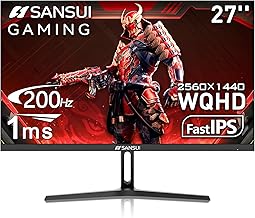
#4. SANSUI WQHD Gaming Monitor
Refresh Rate
Response Time
Resolution
You’ll be hard-pressed to find a monitor offering this level of performance for the price, making the SANSUI a standout value pick. With refresh rates up to 200Hz and a 1ms response time, your gaming will be exceptionally smooth and free from motion blur. The wide 120% sRGB color gamut ensures vibrant and accurate colors, enhancing both gaming and general viewing experiences.
While the build quality might not feel as premium as some higher-end brands, and the HDR implementation is basic, these are minor trade-offs for the incredible performance you get. If you’re seeking maximum refresh rate and responsiveness on a budget, this SANSUI monitor is an outstanding choice that delivers exceptional bang for your buck.
Pros
- Incredible value for the specs
- Very high refresh rate and fast response
- Wide color gamut
Cons
- Build quality is average
- Basic HDR performance
- Stand is not very adjustable
Specifications
#5. KTC H27T27S Computer Monitor
Resolution
Refresh Rate
Sync
You’ll find this KTC monitor to be a solid performer for everyday tasks and casual gaming, offering a good balance of features and a clean, modern look. The 27-inch QHD display provides plenty of screen real estate and sharp details, while the 144Hz refresh rate ensures smoother motion than standard 60Hz panels. The wide color gamut means visuals will pop with vibrancy, making content look engaging.
While it lacks some of the advanced gaming features or the peak brightness of more expensive monitors, it excels as a versatile display for work and play. If you’re looking for a no-fuss upgrade to a 1440p 144Hz experience for general use and light gaming, this KTC model is a sensible and affordable option.
Pros
- Sharp QHD resolution
- Smooth 144Hz refresh rate
- Vibrant colors
Cons
- Not ideal for competitive gaming
- Brightness could be higher
- Basic HDR support
Specifications
#6. KTC H27S5C Curved Monitor
Curvature
Refresh Rate
Certified
You’ll love the immersive experience this KTC curved monitor provides, pulling you right into the action of your favorite games. The 1500R curvature wraps around your field of view, enhancing immersion, while the QHD resolution and 144Hz refresh rate deliver sharp, fluid visuals. With HDR400 support and a high contrast ratio, you can expect deeper blacks and more dynamic range in supported content.
While the color gamut isn’t the widest available, and the HDR experience is entry-level, the overall package is compelling for gamers seeking a more engaging display. If you prioritize immersion and a smooth gaming experience over absolute color perfection, this curved KTC monitor offers a great way to enhance your setup.
Pros
- Highly immersive curved design
- Smooth 144Hz gaming
- Good contrast ratio
Cons
- Basic HDR performance
- Color gamut could be wider
- Curvature may not suit all users
Specifications
#7. Samsung Odyssey G53F
Refresh Rate
Panel
Premium
You’ll experience incredibly smooth gameplay with the Samsung Odyssey G53F, thanks to its impressive 200Hz refresh rate and responsive IPS panel. This monitor is built for speed, ensuring that fast-paced action remains clear and fluid, giving you a distinct advantage in competitive titles. Features like the Black Equalizer help you spot enemies in dark scenes, further enhancing your gaming performance.
While the HDR10 implementation is basic and the color accuracy might not satisfy professional colorists out of the box, it provides a vibrant and engaging visual experience for gaming. If you prioritize raw speed and a competitive edge in your games, this Samsung Odyssey monitor is a fantastic choice that delivers exceptional performance.
Pros
- Blazing fast 200Hz refresh rate
- Responsive IPS panel
- Useful gaming features
Cons
- Basic HDR implementation
- Color accuracy needs calibration
- Stand lacks adjustability
Specifications
#8. KTC H27S5C Curved Gaming
Curved Display
Refresh Rate
Certified
You’ll find this KTC H27S5C monitor offers a deeply immersive gaming experience without demanding a premium price. The 1500R curve pulls you into the game, complemented by a sharp QHD resolution and a fluid 144Hz refresh rate that keeps motion smooth. With HDR 400 support and a wide 129% sRGB color gamut, visuals are vibrant and engaging, making games and media look fantastic.
While the HVA panel might not offer the absolute best viewing angles or response times compared to high-end IPS panels, it provides excellent contrast and color for the price. For gamers seeking an affordable entry into curved, high-refresh-rate displays, this KTC monitor delivers impressive immersion and visual quality.
Pros
- Immersive 1500R curved display
- Smooth 144Hz gaming
- Vibrant colors and good contrast
Cons
- HVA panel limitations
- HDR is entry-level
- Stand is basic
Specifications
#9. SANSUI ES-G27C1Q Monitor
Refresh Rate
MPRT
Curved
You’ll experience incredibly fluid and responsive gameplay with the SANSUI ES-G27C1Q, making it a fantastic choice for gamers who demand speed. The 180Hz refresh rate combined with a 1ms MPRT response time ensures that fast-moving images are rendered with exceptional clarity, minimizing motion blur. The 1500R curvature enhances immersion, drawing you deeper into your games, while the wide color gamut provides vibrant visuals.
While the stand offers limited adjustability and the HDR capabilities are basic, these are minor drawbacks considering the high-performance gaming features offered at this price point. If you prioritize a smooth, fast, and immersive gaming experience, this SANSUI monitor is a compelling option that delivers excellent performance for its cost.
Pros
- Very high refresh rate and fast response
- Immersive curved design
- Good color vibrancy
Cons
- Limited stand adjustments
- Basic HDR support
- MPRT response time metric
Specifications
#10. Acer Nitro XV271U M3
Refresh Rate
Response Time
Stand
You’ll experience exceptionally smooth and responsive visuals with the Acer Nitro XV271U M3, making it a superb choice for gamers seeking high performance. The 180Hz refresh rate and rapid 0.5ms response time minimize motion blur and ghosting, providing a clear advantage in fast-paced games. Its IPS panel delivers vibrant colors with wide DCI-P3 coverage, and the fully adjustable ergonomic stand ensures comfortable viewing for extended sessions.
While the HDR performance is modest, this monitor truly shines in its core gaming capabilities. It offers a fantastic blend of speed, color quality, and comfort, making it a versatile option for both competitive play and general use. If you’re looking for a high-refresh-rate QHD monitor with excellent ergonomics, this Acer Nitro is a top-tier pick.
Pros
- Extremely high refresh rate and fast response
- Excellent color reproduction
- Fully adjustable ergonomic stand
Cons
- HDR performance is limited
- Built-in speakers are basic
- Can be pricey
Specifications
Unlocking Visual Bliss: Your Guide to a Stellar 1440p 144Hz Monitor
You’re looking to elevate your gaming or productivity experience, and a 1440p resolution paired with a 144Hz refresh rate is the sweet spot for buttery-smooth visuals and sharp detail. Getting this kind of performance without breaking the bank requires a keen eye. We’ll guide you through the essential considerations to ensure you find a monitor that delivers exceptional value and a truly immersive experience, especially when you’re aiming to stay under a certain price point.
The Pillars of Pixel Perfection
When you’re hunting for that ideal 1440p 144Hz monitor, a few key features will dictate its performance and your satisfaction.
- Resolution and Refresh Rate: This is the heart of your search. 1440p (Quad HD) offers significantly more detail than 1080p, while 144Hz means your display updates twice as fast as a standard 60Hz monitor, leading to fluid motion and reduced blur.
- Panel Type: The technology behind the screen matters. IPS panels generally offer excellent color accuracy and wide viewing angles, making them great for both gaming and creative work. VA panels often provide deeper blacks and higher contrast, which can be a boon for cinematic experiences. TN panels, while typically the fastest, may compromise on color and viewing angles.
- Adaptive Sync Technology: Look for support for either NVIDIA G-Sync or AMD FreeSync. This technology synchronizes your monitor’s refresh rate with your graphics card’s frame rate, eliminating screen tearing and stuttering for a seamless visual experience.
- Connectivity: Ensure the monitor has the ports you need, such as DisplayPort and HDMI, to connect to your PC or console. Also, check if the available ports support the full 1440p resolution at 144Hz.
- Sticking to your budget: Finding a 1440p 144Hz monitor within a specific price range means prioritizing. You might need to compromise slightly on certain premium features like HDR support or advanced color calibration to get the core performance you desire.
Navigating the Nuances: Common Shopping Stumbles
Even with clear goals, it’s easy to overlook details that can impact your purchase.
- Overlooking the “Fine Print” on Adaptive Sync: Not all FreeSync monitors are fully compatible with G-Sync, and vice-versa. Check for explicit compatibility statements if you have a specific brand of graphics card.
- Ignoring Ergonomics: A great display is less enjoyable if you can’t position it comfortably. Make sure the stand offers tilt, swivel, and height adjustment, or be prepared to invest in a separate monitor arm.
Your Next 1440p 144Hz Gaming Upgrade Awaits!
For blazing-fast action and crisp visuals, the Acer Nitro models are top contenders, delivering stunning refresh rates for competitive play. If immersive curved displays are your jam, the KTC and SANSUI options provide that wrap-around experience without breaking the bank. For a solid all-rounder that balances gaming and everyday use, the Dell 27 Plus offers great features and adjustability.
Rest assured, every monitor we’ve highlighted offers excellent value and fits comfortably within a budget-conscious shopper’s range. Don’t wait – click through to see which of these fantastic 1440p 144Hz monitors is available for you right now!